
• Welcome to PS6Forums - The #1 PlayStation Forum. Why not take a minute to register for your own free account now? Registration is completely free and will enable the use of all site features including the ability to join in or create your own discussions.

How to do port forwarding on PS5

philip_austin

New Member
Hi, Does anyone know how to do port forwarding on PS5, The method is same as it was for PS4 or its different?
Actually I have recently purchased PureVPN by using there NewYear offer of $89 5 Year Plan and now want to configure the portforwading on PS5.
 
Last edited:
Head over to your PS5 Settings
Scroll down and select Network
Select View Connection Status
You’ll see the IP Address of your PlayStation 5. Note this down as you’ll need it later on.
Also, note down the MAC address of your PS5.
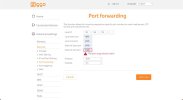
Log in to your router via the browser and head over to the Port Forwarding section.
Manually assign the IP address to your PS5 console from the data you’ve noted down (Step 4 & Step 5).
Also, add ports for TCP and UDP. If your router supports both protocols, then add 1935, 3074, 3478-3480. If your router does not have the ‘both’ option, then add TCP and UDP ports separately: Protocol TCP: 1935,3478-3480 & Protocol UDP: 3074,3478-3479.
Once the changes have been done, reboot your router.
Once the router restarts, you’ll notice a significant improvement in your NAT type.
 
Head over to your PS5 Settings
Scroll down and select Network
Select View Connection Status
You’ll see the IP Address of your PlayStation 5. Note this down as you’ll need it later on.
Also, note down the MAC address of your PS5.
Log in to your router via the browser and head over to the Port Forwarding section.
Manually assign the IP address to your PS5 console from the data you’ve noted down (Step 4 & Step 5).
Also, add ports for TCP and UDP. If your router supports both protocols, then add 1935, 3074, 3478-3480. If your router does not have the ‘both’ option, then add TCP and UDP ports separately: Protocol TCP: 1935,3478-3480 & Protocol UDP: 3074,3478-3479.
Once the changes have been done, reboot your router.
Once the router restarts, you’ll notice a significant improvement in your NAT type.
How do I add these values for both protocols? I dont understand how and where to put these numbers!
 

Attachments

  • photo_2023-04-07 18.32.52.jpeg
    photo_2023-04-07 18.32.52.jpeg
    143.3 KB · Views: 1

Get Connected With PS6Forums.com

Like PS6 Forums!

Advertisements

Back
Top