Hey guys, this is my first post on the forum, and I thought this would be the best place to ask. I am using my Android phone as a hotspot in order to connect to the net. No lines here where I stay. I have been trying to find a way around this as the ping fluctuates far too much. Yet the same sim via the dongle is a constant 50ms.
So, I managed to get this right a long time ago, but for the life of me, cannot remember how I did it :/
I have the following:
Laptop running win8.1
Vodafone K3772-Z 3G dongle
TP-Link TD-W8960N ADSL Router.
What I would like to do is share the 3G dongle, which is plugged into my laptop via USB, through the router so I can use it for my PS4. I am using my S2 as a hotspot, but it is extremely sporadic. ping ranges from 120-500ms to a server, while when using the dongle, it's a perfect 120-150ms.
I am not 100% sure as to what settings I need to use in order for the router to basically share the connection. I am totally lost here. If anyone can give me a step by step guide, it would be grand. By the way, yes, I have "shared" the 3G dongles connection, but nadda.
Thank guys!


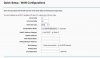
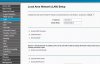
Not too sure what on earth to do. What must the ip addresses be on each machine? subnet masks? etc etc.
So, I managed to get this right a long time ago, but for the life of me, cannot remember how I did it :/
I have the following:
Laptop running win8.1
Vodafone K3772-Z 3G dongle
TP-Link TD-W8960N ADSL Router.
What I would like to do is share the 3G dongle, which is plugged into my laptop via USB, through the router so I can use it for my PS4. I am using my S2 as a hotspot, but it is extremely sporadic. ping ranges from 120-500ms to a server, while when using the dongle, it's a perfect 120-150ms.
I am not 100% sure as to what settings I need to use in order for the router to basically share the connection. I am totally lost here. If anyone can give me a step by step guide, it would be grand. By the way, yes, I have "shared" the 3G dongles connection, but nadda.
Thank guys!
Not too sure what on earth to do. What must the ip addresses be on each machine? subnet masks? etc etc.