• Welcome to PS6Forums - The #1 PlayStation Forum. Why not take a minute to register for your own free account now? Registration is completely free and will enable the use of all site features including the ability to join in or create your own discussions.

Hello

I'm totally not a troll if you guess by reading my name.

Edit: Ok, someone please tell me how this image thing works, I put the wrong image and now it's doing this crap when I try to edit it out -_-.
Edit2: Manage Attachments doesn't even have a delete image button. JOY.

serious_business_lego.jpg
 
Last edited by a moderator:
Hey! Welcome to the forums! I'm on my tablet right now, but I will make sure to come back in the morning and walk you through how to delete images via screenshots. I agree, it is tricky. Actually, I'm sure other people will have the same question and I know that I had the same problem when I first started. I'll post a how to thread for images tomorrow and I'll get you the link :)
 
I'm totally not a troll if you guess by reading my name.

Edit: Ok, someone please tell me how this image thing works, I put the wrong image and now it's doing this crap when I try to edit it out -_-.
Edit2: Manage Attachments doesn't even have a delete image button. JOY.

View attachment 343

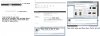
Welcome to the forums! I took care of the image troubles you were having. Just a FYI, the Manage Attachments does have a delete button, simply drag your mouse over the image you want to delete and you will see a small "x" on the top right corner of the image. Click the "x" and your image will be deleted.
 
Untitled-2.jpg

I hope this helps! Let us know if you need any more help!

P.S. (I was just giving you a head time Kn1ght ;) )
 
Last edited:

Get Connected With PS6Forums.com

Like PS6 Forums!

Advertisements

Back
Top