Hi
I do not know if this is the correct area or if this is the correct site to post this problem but here goes:
So the R2 trigger on my ps4 controller is always pushed down
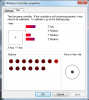
The attached picture is my ps4 plugged into my computer. The 8 is highlighted to show that the R2 trigger is being pressed down and the Y rotation bar represents how much it is pressed down.
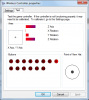
The second picture is me physically pulling the r2 trigger away from controller to try and stop it from being pressed,
So i have opened my ps4 controller, removed the back cover and when I do, the r2 trigger is no longer being pressed. and the ps4 controller works fine.
when i put the back cover back on, the r2 trigger once again gets pushed down.
So im assuming that the cover or something on the back covre is tight and is pushing down on the trigger when i put it back on, but I do not know what. I do not see any thing out of the ordinary as i compare the holes where the L2 and R2 triggers go. There isnt anything protruding out of the hole where R2 trigger is which may cause this issue
If anyone knows how i can fix this let me know.
I can put more pictures if needed
I do not know if this is the correct area or if this is the correct site to post this problem but here goes:
So the R2 trigger on my ps4 controller is always pushed down
The attached picture is my ps4 plugged into my computer. The 8 is highlighted to show that the R2 trigger is being pressed down and the Y rotation bar represents how much it is pressed down.
The second picture is me physically pulling the r2 trigger away from controller to try and stop it from being pressed,
So i have opened my ps4 controller, removed the back cover and when I do, the r2 trigger is no longer being pressed. and the ps4 controller works fine.
when i put the back cover back on, the r2 trigger once again gets pushed down.
So im assuming that the cover or something on the back covre is tight and is pushing down on the trigger when i put it back on, but I do not know what. I do not see any thing out of the ordinary as i compare the holes where the L2 and R2 triggers go. There isnt anything protruding out of the hole where R2 trigger is which may cause this issue
If anyone knows how i can fix this let me know.
I can put more pictures if needed