• Welcome to PS6Forums - The #1 PlayStation Forum. Why not take a minute to register for your own free account now? Registration is completely free and will enable the use of all site features including the ability to join in or create your own discussions.

Screen Tearing AC4

Johnmaz60

New Member
Hi, When I move the right stick to move the in game camera I notice things appear to blur almost like having double vision. I think it is called screen tearing but I am not sure. Has anyone experienced this for Assassisan's Creed 4? Thanks!
 
I'd need to see an example. If you have maybe an elgato capture card or take a cell pic I could help you determine whats up. It sounds like you're noticing the motion blur inside Ubisoft's Anvil Next engine. One way to check if its the motion blur is to try moving the camera around at slow speeds and then speed it up faster and faster. If you don't notice anything when moving the camera slowly, then its probably the motion blur component inside the gaming engine. Actually if you want to send me a friend request and then a video of said problem, then maybe we can get to the root of it. My PS4 username is Utookmine.. If I don't hear form you gain, then good look man.
 
Last edited:
Hey there,

Thanks for you response. I do notice the blur when I move the camera slowly and it seems to get worse when I move the camera quickly. I can take a video with my phone. Can I email it to you? The video share system wants access to your Facebook account which I don't want to give them. Thanks!
 
Hey there, I took a video with my phone but it is hard to see the blur. The blur is much more pronounced when Kenway is running and you turn the camera. Thanks!
 
Hi, not quite sure what you means however the blur whenever the camera moves is an added feature in many video games and is indeed supposed to be there. However depending on the severity of it, it could be a frame rate issue.
 
This sounds like regular motion blur and there's probably nothing you can do about it. Screen tearing is a very different issue in which part of the image doesn't properly align with the rest because it's not being rendered fast enough, causing two or more frames to be shown at the same time.

So, yeah. This sounds like regular motion blur and it's most likely intended to be there.

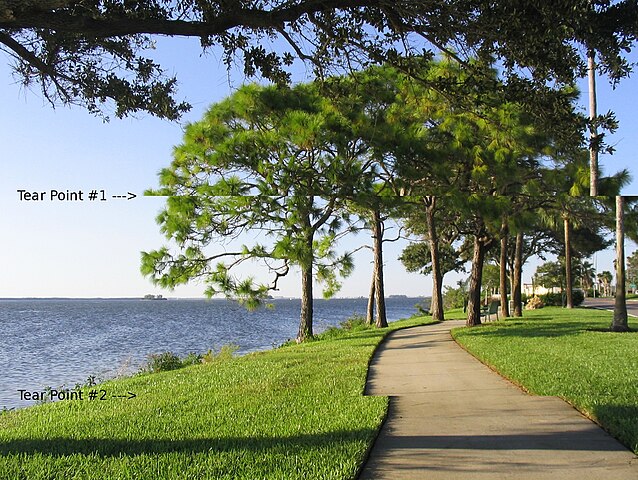
This is what screen tearing looks like, for the record:
638px-Tearing_%28simulated%29.jpg
 
This sounds like regular motion blur and there's probably nothing you can do about it. Screen tearing is a very different issue in which part of the image doesn't properly align with the rest because it's not being rendered fast enough, causing two or more frames to be shown at the same time.

So, yeah. This sounds like regular motion blur and it's most likely intended to be there.

This is what screen tearing looks like, for the record:
638px-Tearing_%28simulated%29.jpg

I was going to make this point but I established that the confusion was over with earlier on... my bad, thanks for pointing out!
 
I dont think its your game disk problem or players issue I think you should check that is your system able to synchronize the heat properly or not?
 

Get Connected With PS6Forums.com

Like PS6 Forums!

Advertisements

Back
Top