• Welcome to PS6Forums - The #1 PlayStation Forum. Why not take a minute to register for your own free account now? Registration is completely free and will enable the use of all site features including the ability to join in or create your own discussions.

Trying to connect ps5 and pc via ethernet.

limpythecat

New Member
I am trying to connect my ps5 and the pc to the internet via an ethernet cable using an RJ45 coupler.
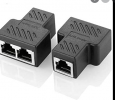
1625782709456.png


The problem is, when Both cables are connected, the ps5 keeps disconnecting and cannot maintain a connection to the ethernet. It repeats the message of ethernet connected and disconnected.

The ethernet cable for the router we use comes in through my bedroom floor, so connecting it directly to the router is not an option.
Is there any way I can split this single ethernet, to connect to both my PC and PS5 to the internet without issue? Or should I just invest in a long range wi fi reciever for the pc and connect the ps5 to ethernet instead?
 
I've never done what you are doing, but I have multiple devices hooked up to my router via an ethernet switch on my TV console (2 PS2s, PS3, PS4, Xbox 360, smart bulb hub and a couple other things I'm blanking on now lol). I have about 6 or so devices connected through ethernet in both the switch and directly into the router. The switch I bought I bought in like 2004ish and I'm still using it. And I think I paid like 20 or 30 for it at the time. They're really cheap, especially now. You can get one on Amazon for well under 20 bucks (and you can return it if it doesn't work in your set up :) ) from a known networking manufacturer like Netgear or Linksys. Now I'm not familiar with the coupler you are using, but it may only allow one device to use ethernet at a time, hence why the PS5 may be getting kicked off constantly. Try the switch. You basically plug in the ethernet cable and then the devices in the switch and you're good to go.

EDIT: I looked up the coupler. All the listings on Amazon that have 2 in 1 out say you can only use one device at a time. Ditch it and get a network switch :) Something like this will work.
 
Last edited:
I've never done what you are doing, but I have multiple devices hooked up to my router via an ethernet switch on my TV console (2 PS2s, PS3, PS4, Xbox 360, smart bulb hub and a couple other things I'm blanking on now lol). I have about 6 or so devices connected through ethernet in both the switch and directly into the router. The switch I bought I bought in like 2004ish and I'm still using it. And I think I paid like 20 or 30 for it at the time. They're really cheap, especially now. You can get one on Amazon for well under 20 bucks (and you can return it if it doesn't work in your set up :) ) from a known networking manufacturer like Netgear or Linksys. Now I'm not familiar with the coupler you are using, but it may only allow one device to use ethernet at a time, hence why the PS5 may be getting kicked off constantly. Try the switch. You basically plug in the ethernet cable and then the devices in the switch and you're good to go.

EDIT: I looked up the coupler. All the listings on Amazon that have 2 in 1 out say you can only use one device at a time. Ditch it and get a network switch :) Something like this will work.

Thanks for your reply, and recommendations! Seems that the coupler was definitely the issue.
 
I am trying to connect my ps5 and the pc to the internet via an ethernet cable using an RJ45 coupler.
View attachment 1030


The problem is, when Both cables are connected, the ps5 keeps disconnecting and cannot maintain a connection to the ethernet. It repeats the message of ethernet connected and disconnected.

The ethernet cable for the router we use comes in through my bedroom floor, so connecting it directly to the router is not an option.
Is there any way I can split this single ethernet, to connect to both my PC and PS5 to the internet without issue? Or should I just invest in a long range wi fi reciever for the pc and connect the ps5 to ethernet instead?
Ethernet is good for all things net. In other words, you can have one home network consisting of XBox, PS5, PS4, my computer, my GF's computer etc. All will run on ethernet. I am currently doing it and I have fiber coming into the house. All are "home runs" back to the point of origin or router.

If you are using a 2 in-1 out coupler, then you must understand that when you do that, the ethernet cable with the most traffic will continue on through. The other one won't because it needs a continuous stream or packet of bits to travel through. If both are in use, the stronger one will prevail. I never recommend these. Use a router and if you have to, add a switch. It's a better and more reliable method to use.
 

Get Connected With PS6Forums.com

Like PS6 Forums!

Advertisements

Back
Top