• Welcome to PS6Forums - The #1 PlayStation Forum. Why not take a minute to register for your own free account now? Registration is completely free and will enable the use of all site features including the ability to join in or create your own discussions.

PS4 doesn't display anything

Bouncy

New Member
Hi,

I bought my PS4 about 3 weeks ago. Everything was fine during the first week. I hooked it up to my iiyama E2278HD using dvi to hdmi adapter (no hdmi input on monitor). I decided to show PS4 to my parents and colleagues in hometown and I plugged it into two HDTVs - Sony and Samsung. It worked fine since I plugged it back to the monitor. What is strange, PS4 worked for some time but when I turned it off and on again it stopped display anything on the screen. My question is: Is it possible that dvi-hdmi adapter broke console's hdmi port? As I mentioned before everything was fine till that "displays change". I tried to reset monitor's settings and it didn't help. I'm also planning to plug it again to that HDTVs this week (I'm going back to hometown).

The monitor supports HDCP.
PS4 model: 1216B 1TB.

I'm awaiting for your response.
 
Hey bouncy. Welcome aboard. Did you check the display settings on the PS4? Sometimes when it automatically changes to a tv, it may not have reverted back. That would be a good start. And if it works on an HDTV again but not the monitor, could be the adapter.
 
Hey bouncy. Welcome aboard. Did you check the display settings on the PS4? Sometimes when it automatically changes to a tv, it may not have reverted back. That would be a good start. And if it works on an HDTV again but not the monitor, could be the adapter.

Thanks for your reply. I connected console back to TV. It displayed bad colours for some time and after I disconnected PS4 from hdtv and connected it again - no response. So, the same as on the monitor. To me the hdmi console's input was faulty, because I can't believe that some adapter could damage the console. Luckily, it is under warranty so I sent it to service center. Hope they'll fix that.
 
Thanks for your reply. I connected console back to TV. It displayed bad colours for some time and after I disconnected PS4 from hdtv and connected it again - no response. So, the same as on the monitor. To me the hdmi console's input was faulty, because I can't believe that some adapter could damage the console. Luckily, it is under warranty so I sent it to service center. Hope they'll fix that.

Definitely sounds like the culprit. Though just for the hell of it, do you have a spare HDMI cable? If so, why not switch them and see if the cable is faulty. Would definitely suck to send it in and nothing's wrong :)
 
Definitely sounds like the culprit. Though just for the hell of it, do you have a spare HDMI cable? If so, why not switch them and see if the cable is faulty. Would definitely suck to send it in and nothing's wrong :)

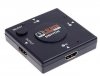
You mean PS4 hdmi input or hdmi adapter as a culprit? No worries, I tried another cable and the same. I am also wonderring, if hdmi switch will do the trick and keep all cables at the same position? When I get my console back I'm going to plug my monitor and PS4 to that switch so that it won't be needed to plug and unplug the hdmi-dvi adapter every time because there is only one DVI on monitor. Maybe that is the case, that I disconnected hdmi-dvi adapter too many times and PS4 went crazy... I don't know how it works.

HDMI Switch:

F02681-Mini-font-b-Splitter-b-font-3-Port-1080P-Video-HDMI-font-b-Switch-b.jpg
 
Getting an HDMI switch would be a good idea. They aren't that expensive, its less inconvenient to you and will cut down on wear on the ports. It is possible that you unplugged it one too many times or even possibly static shocked it unplugging or plugging it in. Electronics can be weird if you do something just right to mess it up. Either way you have it under warranty so it won't cost you anything except a couple weeks of gaming. Keep us updated on how you make out :)
 
I have received a confirmation that they are sending back new console so the old one must have been replaced. It should be delivered on tuesday next week. In the meantime I was looking for proper hdmi switch and I found interesting device with integrated hdmi cable. It is something like that:
1X-3-Port-1080P-font-b-HDMI-b-font-splitter-AUTO-font-b-Switch-b-font.jpg
Are such devices hdcp compatible? My monitor supports hdcp. Should that switch support hdcp as well?
 
Where did you find that switch? Amazon? If you have a link, I may be able to take a look at it for you :) If it's on Amazon, you can filter through the reviews to see if people mention it supports HDCP and if not, you can always ask the question there to see what others say.
 

Get Connected With PS6Forums.com

Like PS6 Forums!

Advertisements

Back
Top